Inventory system in Obsidian
Your workshop, fully under control: Obsidian as an inventory and project management system
Or: how to stop maintaining "important spreadsheets" and actually know what you have in stock.
The problem
Every maker, electronics hobbyist or small workshop owner knows the situation. Dozens of small drawers with components, half-finished projects, a shelf of glues and paints "I know I have somewhere", a box of screws "...of the right size, I think". And of course that critical moment: you sit down to assemble something, and the resistor you need is missing — or worse, you ordered it three months ago but can't find where you put it.
Spreadsheets work for a while. Until they stop. They don't link to each other, have no context, don't know that "this component is also in three other projects" — and inevitably get abandoned.
In my case, I run the Arta Foc Fire Dancers Theatre. I build a lot of equipment and use a huge range of techniques — from electronics, through 3D printing, all the way to welding. So I needed inventory tracking for my projects (parts, filaments) plus consumables for shows (fuels, pyrotechnic materials).
Why Obsidian?
Obsidian is, at its core, a local markdown note editor. But with the Dataview plugin it becomes something much more powerful: a database where notes are records and YAML frontmatter are fields.
The key advantages:
- Local and offline — all data stays in files on your disk
- Free format — you decide what fields a note has
- Bidirectional links — wikilinks <span class="text-amber-500/50" title="Nieznany link">[[...]]</span> create connections between notes
- DataviewJS — JavaScript queries that can render interactive tables, filter, sort and aggregate
System architecture
The Obsidian Inventory System consists of five note types and fifteen DataviewJS scripts that connect them all.
Components  ──┐
Consumables ──┤──→ Projects ──→ Inventory (built items)
Locations   ──┘
                └──→ Event Types ──→ Events (calendar)
Note types
Components — individual parts: resistors, bolts, PCB modules, plywood sheets. Each has a YAML type, category, price_per_unit and locations (list of location links with quantities).
Consumables — materials used up during work: glues, paints, sandpaper. Similar to components but with a flat stock field and unit (ml, g, sheet, etc.).
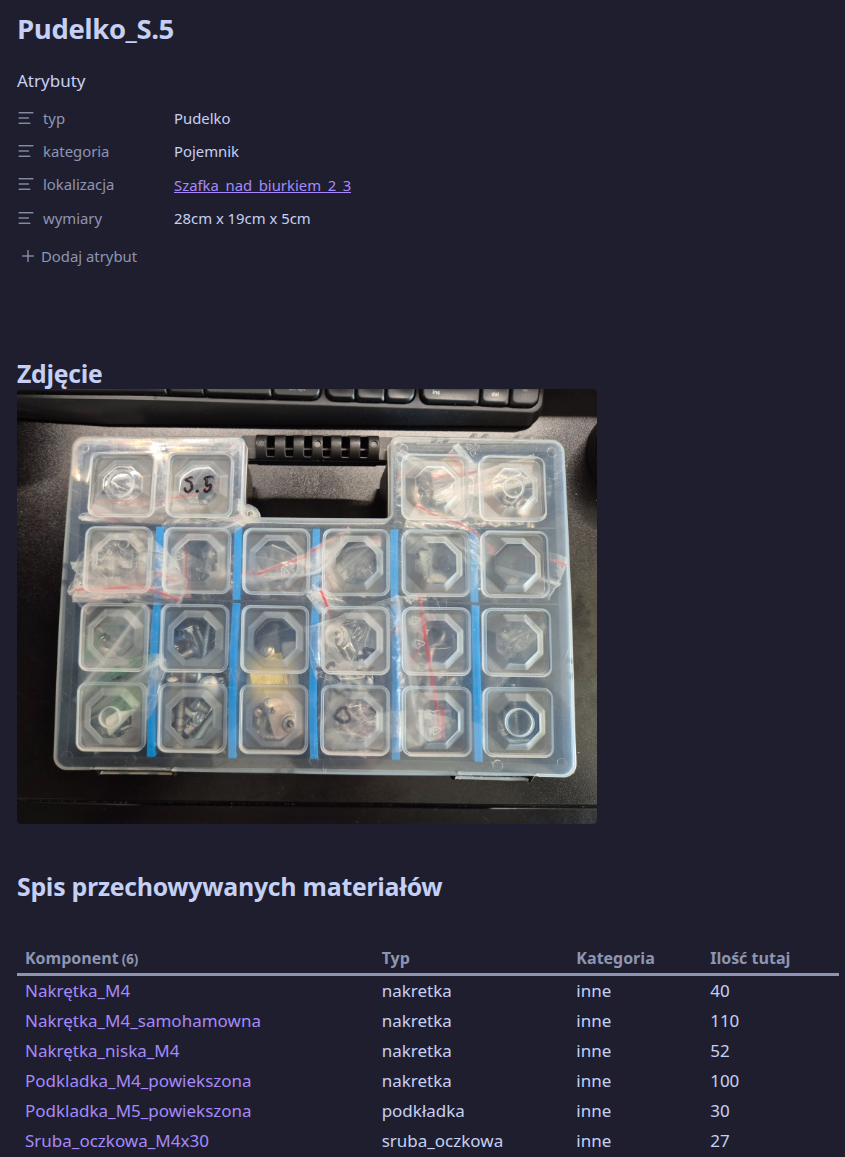
Locations — three-level hierarchy: Room → Cabinet/Shelf → Container/Box. Each level has its own template with automatically populated content lists.
Projects — the heart of the system. Each project contains a list of components (YAML links with quantities) and optionally subprojects (reusable modules). The components_table.js script recursively traverses the entire tree and generates a complete Bill of Materials.
Inventory items — physical instances of built objects. Linked to the source project (source_project), their location and condition (working, needs_repair, damaged, retired). Each item has a repair history log.
Event Types + Events — recipes for workshops or presentations (what and how much you need per event) + a calendar of specific dates. The upcoming_events.js script combines all planned events into a single materials balance.
Recursive BOM — the core mechanism
The most powerful feature of the system is automatic Bill of Materials calculation with subproject support.
Consider this structure:
Mood Lamp
├── LED Controller (subproject × 1)
│   ├── ATtiny85 × 1
│   ├── Resistor 220Ω × 3
│   └── Red LED 5mm × 3
├── 3D Printed Enclosure × 1
├── Plywood 3mm A4 × 2
└── Bolt M3×10 × 4
The resolve_komponenty.js script traverses this tree recursively (up to 5 levels deep), accumulates quantities, and compares the result against current stock. If you then say "I want to build 3 lamps", the shopping_list.js script calculates exactly how many of each component you need to order.
Dashboards
The system includes five main dashboards:
- Inventory_Dashboard.md — all built items with filtering by category and condition
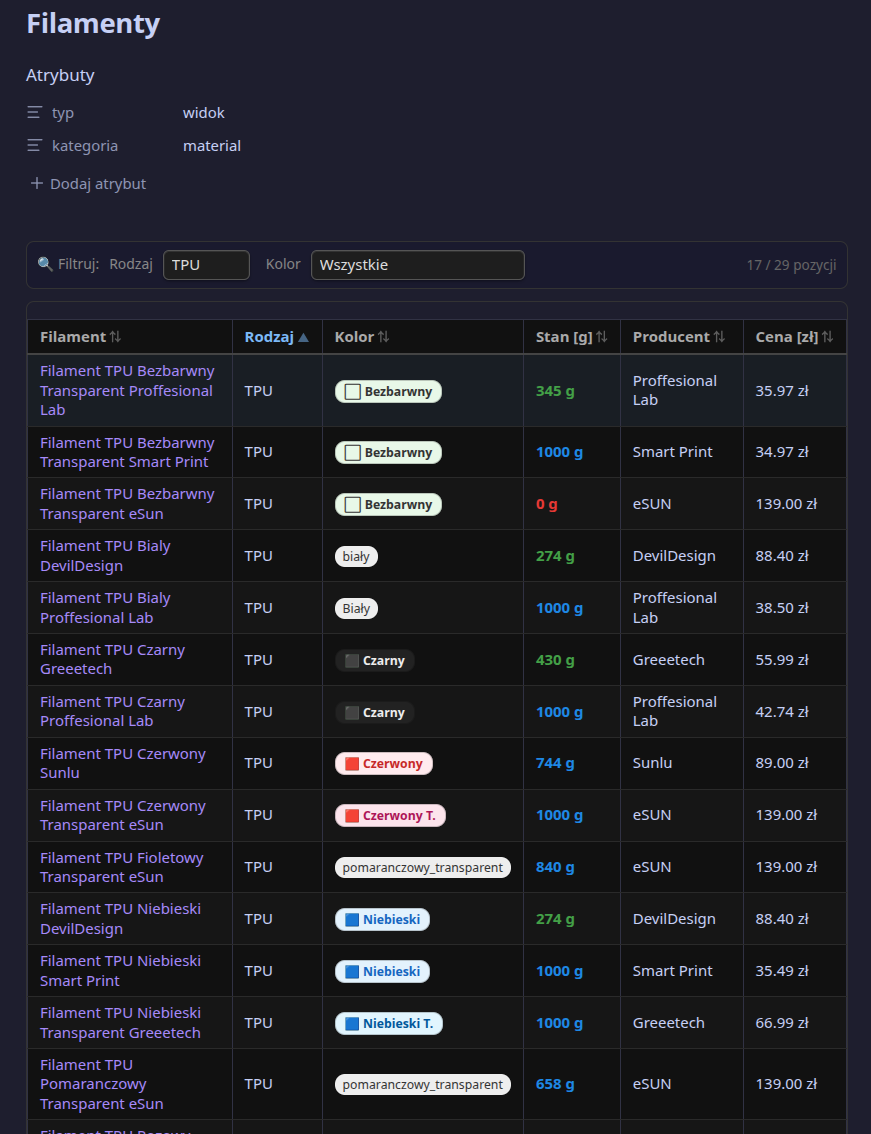
- Consumables_Warehouse.md — consumables with stock levels and locations
- Upcoming_Events.md — calendar of planned events + automatic combined materials balance
- Active_Projects.md — list of ongoing projects
- Shopping_List.md — configurable shopping list: define projects and desired quantities, the table appears automatically
Each dashboard is a regular markdown note that loads DataviewJS scripts. The notes themselves contain no data — all comes from the component files.
How it works in practice
Adding a new component
I create a new note in Components/Electronics/ from a template. I fill in: type, where it lives, how many I have, what it costs. One note, two minutes.
From that moment, the component is "visible" to the entire system: it will appear in the demand table when a project uses it, in the location inventory for the Workshop, and in the profile of any project containing it.
Building a project
In the project's YAML I link components. For a complex project with modules — I create subprojects, connect them with links, set multipliers. Opening the project view automatically shows the fully calculated BOM, taking the entire hierarchy into account.
For each component I can see how much I have in stock and whether that's enough. A red ⚠️ icon signals a shortage.
Planning purchases
I open Shopping_List.md and in the YAML I specify how many units I want to build:
production_goals:
  - project: "<span class="text-amber-500/50" title="Nieznany link">[[Mood_Lamp]]</span>"
    units: 5
The table below automatically calculates the total demand, compares it against stock, and shows what's missing — with a link to the shop.
That's literally one change in one file. No formulas, no manual counting.
Planning workshops
I create an "event type" — a recipe that says what materials are needed for one session. Then I create a specific event with a date and a link to the type. Opening Upcoming_Events.md shows a calendar of all upcoming events and a combined balance — how many materials you need in total for all of them.
What's in the template
The repository contains a ready-to-use set:
15 DataviewJS scripts — the system's logic: BOM recursion, interactive tables with filtering and sorting, materials balances, location inventory.
10 Markdown templates — ready-made patterns for every note type, with pre-filled YAML keys and embedded script calls.
14 example notes — a complete example: a workshop with shelves and containers, several electronic and mechanical components, an LED lamp project with a controller subproject, planned workshops with a materials balance.
5 dashboards — ready-made views aggregating information from the entire vault.
Installation in 3 steps
- Copy the
obsidian-inventory-enfolder to your vault - Replace
Artawith your vault name (onesedcommand or PowerShell snippet — see README) - Enable DataviewJS in plugin settings
That's it. Start with the example files, then adapt them to your own components and projects.
Limitations and when NOT to use it
The Obsidian + Dataview system has its limits:
- It is not an ERP system — no transaction history, accounting, or invoicing.
- No cloud sync — unless you use Obsidian Sync or, like me, Dropbox.
- Scripts only run inside Obsidian — HTML export does not render DataviewJS.
- With very large numbers of notes (thousands), Dataview may slow down — though I haven't experienced this yet.
If you're managing a warehouse with thousands of SKUs and need an invoicing system — this is not the right tool. If you run a workshop, hobby studio, or small workroom — it works really well.
Getting started
- Download or clone the repository.
- Copy the
obsidian-inventory-enfolder into your vault. - Replace
Artawith your vault name (onesedor find-replace). - Open the example notes and browse how they look.
- Create your first component from the template, add it to a project, check Shopping_List.md.
The whole setup takes about 10 minutes. The rest is adding your own notes at whatever pace suits you.
What I use it for
The system is perfectly suited for:
- Electronics hobbyists — component tracking, PCB project BOMs
- 3D printing / laser cutting makers — filament, sheet material, hardware tracking
- Small workshop / repair shop — tool inventory, material stock, customer order planning
- Event organizers (workshops, classes) — materials per event, balance of upcoming workshops
Conclusions
The beauty of this approach is that there is no database server, no complicated SaaS subscription, no sync to worry about. Everything is in plain text files, versioned by git if you like, readable without Obsidian.
YAML frontmatter is surprisingly expressive as a data model: links between notes replace foreign keys, Dataview replaces SQL, DataviewJS gives you full JavaScript flexibility when you need it.
If you spend even 30 minutes a week managing component stock or preparing for workshop events — this system will pay for the setup time in a month.
The template is available as open source. See README.md for installation instructions.
I also created versions in Polish and Spanish! They are available in my project link to Inventory.
License: MIT