Allocatio — a mobile app for tracking your investment portfolio
As usually happens, we have some need, but the tools that already exist either cover only part of it, or offer even more but are far too expensive to justify buying. That was exactly my situation — I wanted something that would let me easily keep track of my investment strategy, without paying a hefty subscription for it. I didn't want fireworks, analytics, or a price feed updated to the millisecond. I also didn't want to send that kind of data to any third party.
"I could use something lightweight, local on my phone, and ideally with support for Treasury bonds" — that last part was especially tricky, because I don't know of a single app that handles it properly.
So, since I'm a developer, and (another reason) I'd wanted for a long time to go through the process of publishing an app on the Play Store — I rolled up my sleeves and... started cracking a whip over the virtual heads of agents. Yes, that's what my life looks like now — I've come to terms with the fact that these days it's mostly not me "stacking the blocks" myself, just telling them what to stack. Sometimes that makes me a little sad, but... I can always spend the time I save building Lego or doing puzzles.
And besides, I now have vastly more possibilities than before.
About the project
Allocatio is a standalone mobile app I built to track and analyze my own investment portfolio — with no need to create an account, log in, or rely on any backend. All data is stored locally on the device, and prices are fetched directly from the free Yahoo Finance and Stooq sources.
The app is not an investment advisor — it's a tool for people who manage their own portfolio themselves and want a complete picture of their investments in one place.
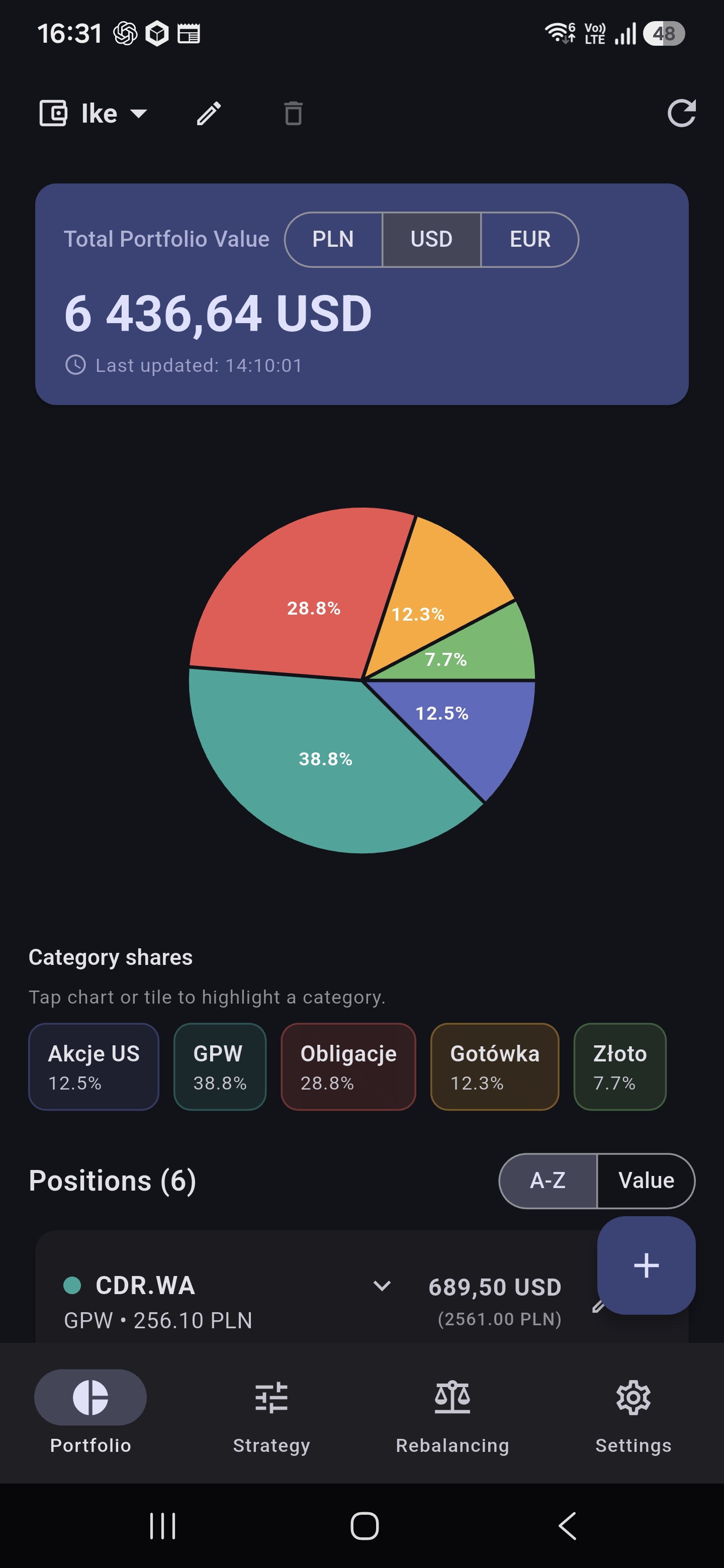
📸 Main screen — portfolio overview with the current valuation and breakdown by asset category
Key features
📊 Real-time portfolio overview
Add your positions (ticker, quantity, asset category) — the app automatically fetches current prices and calculates the portfolio's value in your chosen base currency. It supports stocks from global exchanges (e.g. AAPL, MSFT), the Polish stock exchange, the GPW (CDR.WA, PKN.WA), and even cryptocurrencies (BTC-USD).
Tapping a position's tile expands it to show full details: the company name (fetched automatically from Yahoo Finance and cached in the local database), the number of units, the unit price, and the value in the base currency.
📸 List of positions with current valuation, category breakdown, and total value
🏦 Treasury bonds
One feature I paid particular attention to is support for Polish retail Treasury bonds — COI, EDO, ROS, ROD, TOS, and others. After entering a bond series (e.g. EDO1133, COI0630), the app:
- automatically fills in the purchase and maturity dates based on the issue and tenor,
- fetches the interest rate from a built-in catalog of historical rates (a bundled CSV with real rates and margins), with a fallback that scrapes obligacjeskarbowe.pl,
- calculates the current valuation of the bond based on its interest-rate model (fixed, floating, or CPI inflation-indexed),
- also lets you manually fill in rates for series not yet present in the catalog.
Thanks to this, I can hold stocks, cryptocurrencies, Treasury bonds, and manually valued assets (e.g. real estate) side by side in a single portfolio — and the app works out the total value and allocation on its own.
🏷️ Manually valued (custom) assets
Besides market instruments and bonds, I added the ability to enter manually valued assets — e.g. real estate, a car, a savings account. Just provide a name, the current valuation, and a currency (PLN/USD/EUR), and the position is automatically converted into the portfolio's base currency at the current FX rate.
🗂️ Multi-portfolio and an advanced Combined Portfolio
I implemented management of multiple portfolios at once — e.g. a retirement portfolio, IKE, IKZE, an emergency fund, or a speculative portfolio. A built-in Combined Portfolio automatically consolidates positions from all sub-portfolios, giving a full picture of your total investments in one place.
To make analyzing such a varied set of assets genuinely clear, I equipped the Combined Portfolio with 4 advanced allocation visualization modes:
- Categories — an aggregated breakdown of your entire net worth by asset class (e.g. the total share of stocks, Treasury bonds, gold, and cash, regardless of which account they sit in).
- Portfolios — the percentage share of each sub-portfolio (e.g. what percentage of your total assets is made up of your IKE, IKZE, or Emergency Fund).
- Structure (Portfolio + Category) — a nested two-level donut chart (Nested Pie Chart): the inner ring shows the individual portfolios, and the outer ring breaks each of them down into its own asset categories.
- Positions (Portfolio + Position) — the most detailed nested 2-level chart: the inner ring shows the portfolios, and the outer ring breaks them down into individual instruments (stocks, bonds, ETFs).
The charts are fully interactive — tapping any slice automatically shows a detailed view of that category or instrument.
📸 Combined Portfolio with 4 visualization modes — including the two-level nested donut chart (Portfolio + Category / Position)
🎯 Investment strategies and templates
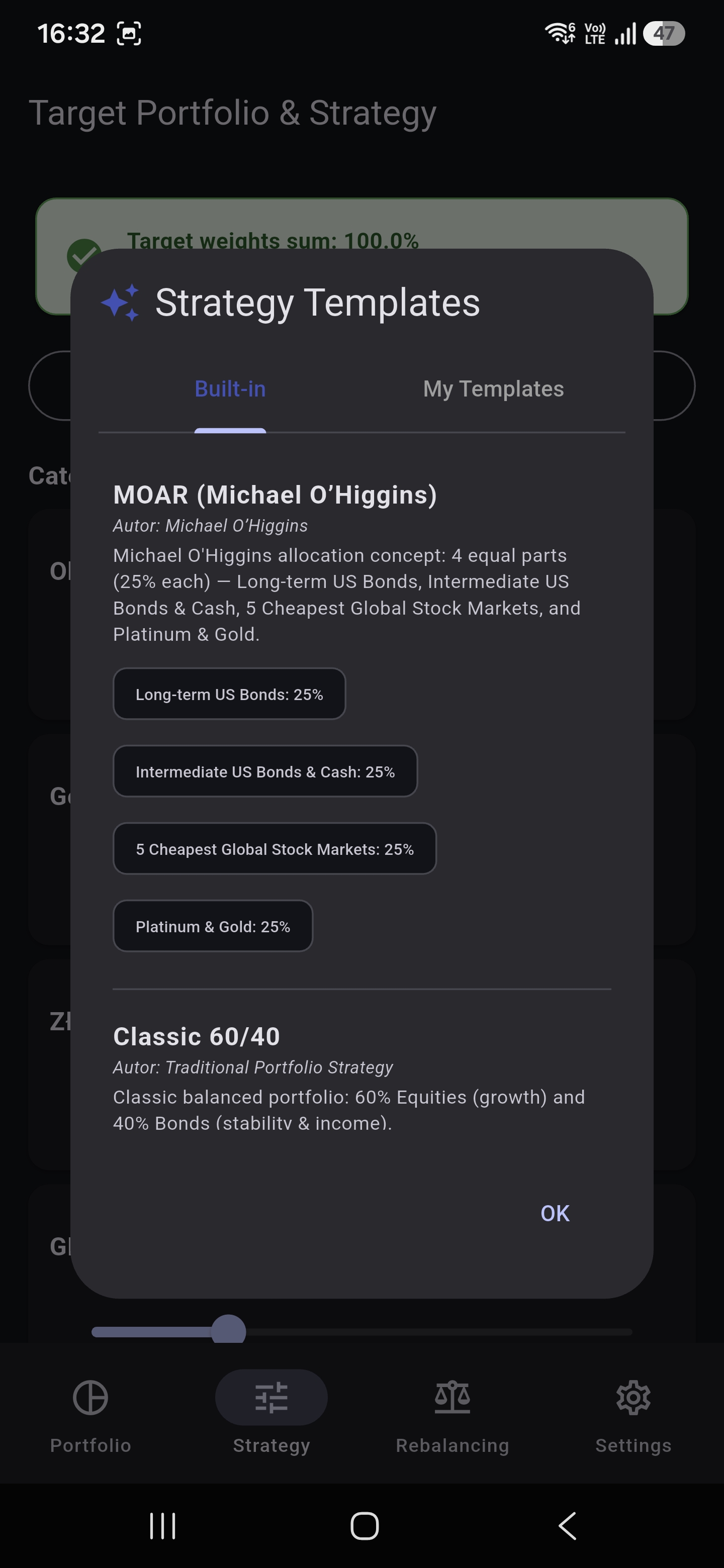
Define your target asset allocation strategy — manually, or by using one of the built-in templates:
- MOAR (Michael O'Higgins) — 4 equal parts: long-term bonds, medium-term bonds, the cheapest markets, precious metals
- Classic 60/40 — the classic stocks/bonds split
- Permanent Portfolio (Harry Browne) — 4×25%: stocks, bonds, cash, gold
- All Weather (Ray Dalio) — a risk-balanced portfolio
- Ivy Portfolio (Marc Faber) — 4 main asset classes
- 5 Cheapest Markets (Global Value) — a strategy based on CAPE/P/E
I also added the ability to save your own strategy templates and come back to them at any time.
📸 Defining a target strategy with sliders — real-time validation that weights sum to 100%
⚖️ Portfolio rebalancing
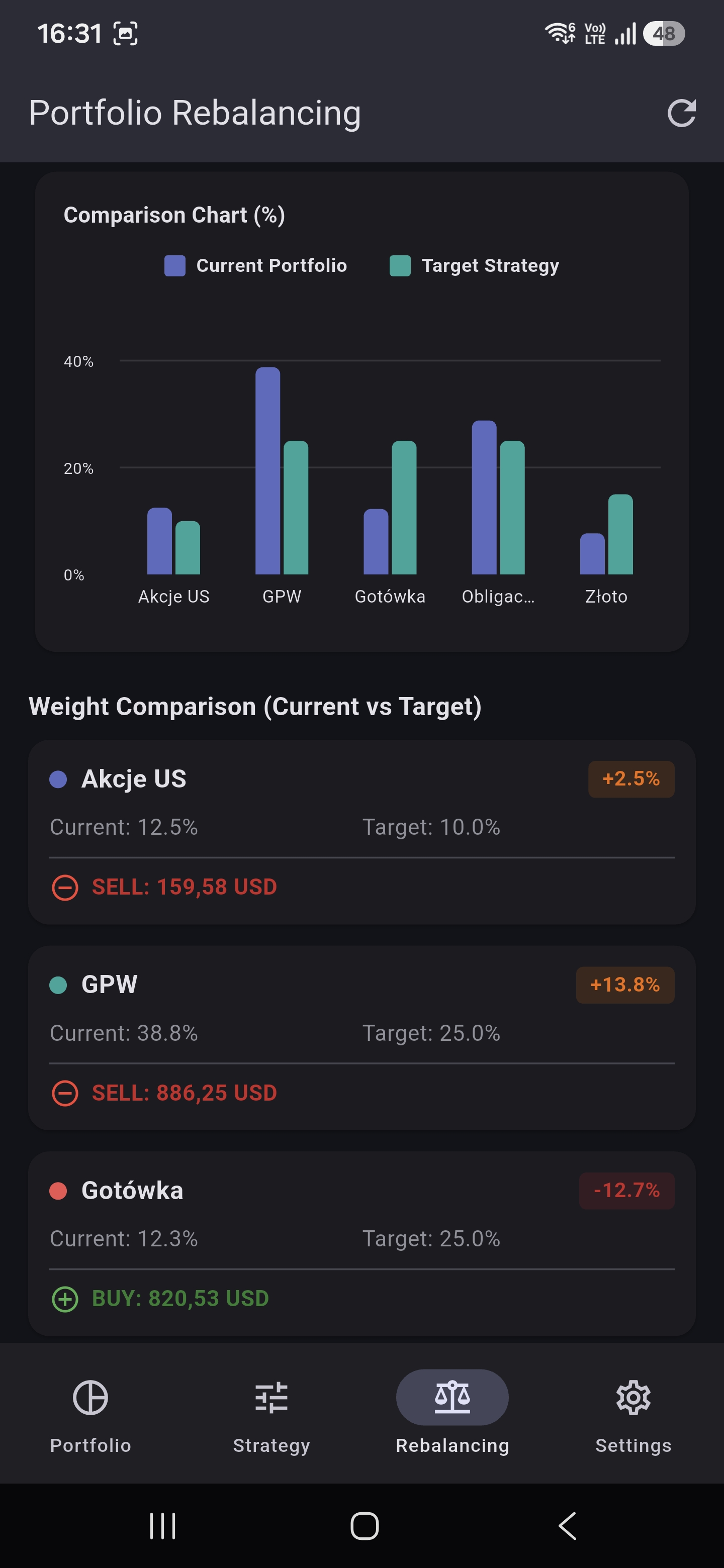
Based on your defined strategy and the portfolio's current valuation, the app calculates deviations from the target and suggests how much to buy or sell in each category — in specific amounts, in your chosen currency. You can also enter a planned deposit and see the optimal split for the new funds.
The visualizations include:
- A pie chart with overlaid rings (current portfolio vs. target)
- A bar chart comparing percentage weights
- A deviation table with color-coded BUY/SELL/OK indicators
📸 Rebalancing — comparing current and target weights with transaction suggestions
💾 Backup (CSV)
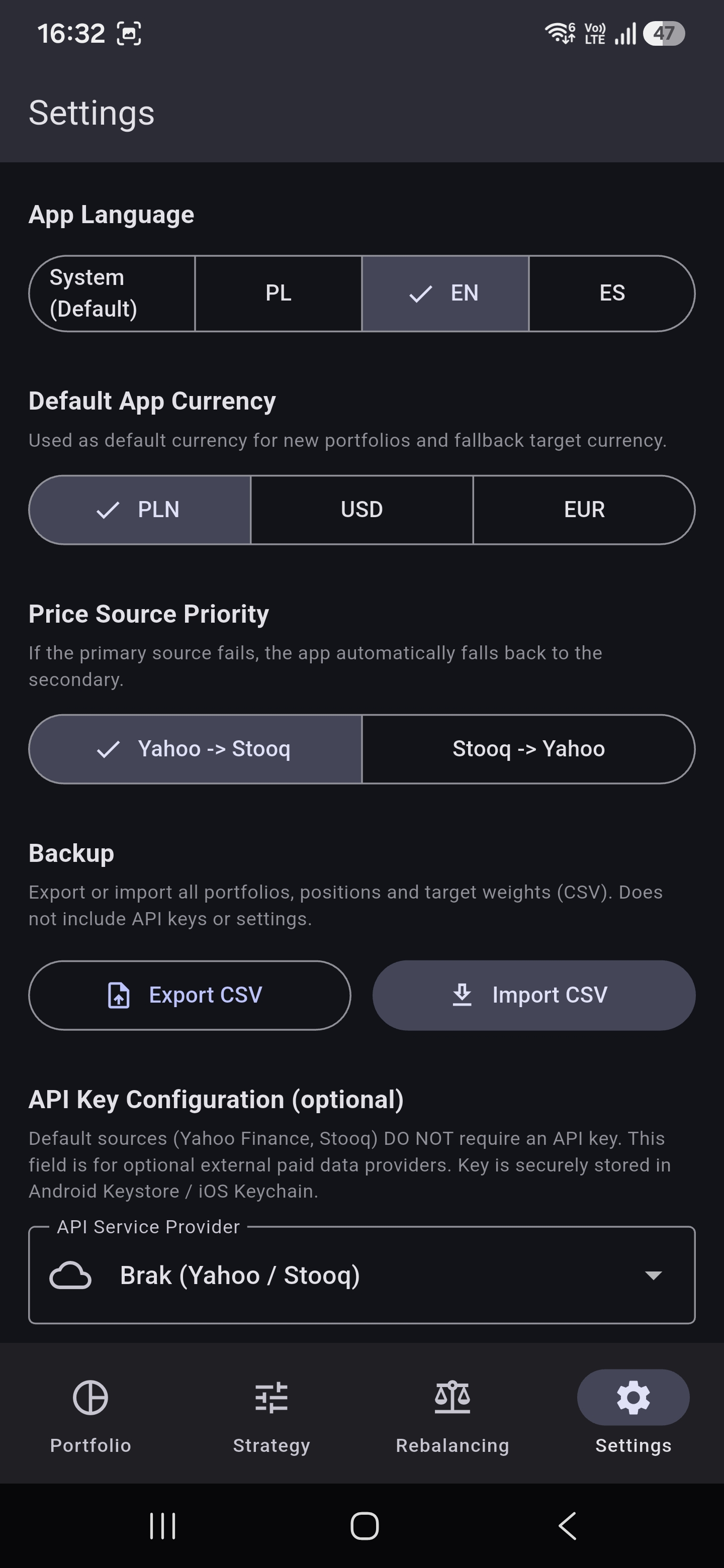
I implemented full data export and import in CSV format — covering all portfolios, positions (including bond metadata, series, and custom valuations), and the strategies' target weights. This makes it easy to move your data to a new device or make a backup — just share the file and import it again in the settings.
🌍 Multilingual support
The interface is available in three languages:
- 🇵🇱 Polish
- 🇬🇧 English
- 🇪🇸 Spanish
The language is set automatically based on the system settings, or it can be chosen manually in the settings.
💱 Multi-currency support
Each portfolio has its own base currency (PLN, USD, or EUR), independent of the app's global setting. Positions held in a foreign currency are converted automatically at current FX rates fetched from Yahoo Finance.
🔒 Privacy and security
- Zero data sent to any server — everything runs locally on the phone
- SQLite database on the device
- API keys (optional, for paid providers) stored in the system's Android Keystore / iOS Keychain
- The default price sources (Yahoo Finance, Stooq) require no keys at all
💎 Monetization and the Allocatio Pro version
The app is available for free, using a model based on discreet Google AdMob ads (a banner at the bottom of the screen and occasional full-screen ads with a built-in 10-minute time limit).
For users who value a clean interface, I built a one-time Allocatio Pro purchase handled directly through Google Play Billing:
- A one-time fee, with no annoying subscriptions
- Permanent removal of all ads throughout the entire app
- Secure status storage in the Android Keystore / iOS Keychain, as well as in the Google account cloud
Architecture and tech stack
I built the app using a layered architecture, with a clear separation of responsibilities:
| Layer | Technology | Role |
|---|---|---|
Data (data/) |
Drift (SQLite), Dio (HTTP), Secure Storage, InAppPurchase | Repositories, price sources, Play Billing purchases, cache |
Domain (domain/) |
Pure Dart functions | Models, calculation logic, bond valuation, i18n |
Presentation (presentation/) |
Flutter + Riverpod | Screens, widgets, state providers, ad handling |
Prices are fetched from two interchangeable sources behind a shared PriceSource interface, with an automatic fallback — if Yahoo Finance doesn't respond, the request goes to Stooq (and vice versa). Company names (shortName) are cached in SQLite, so Yahoo doesn't need to be queried every time the app is opened.
The valuation of retail Treasury bonds is handled in a separate module (bond_valuation.dart), which supports various interest-rate schemes (fixed, floating, CPI-indexed) and relies on the local rate catalog.
Development plans
Right now the app meets all of its goals and doesn't really need much more — unless a need arises, either mine or the users'.
The tentative further roadmap:
- [x] Official launch on Google Play (production version) — this one's definite.
- [ ] Notifications when allocation thresholds are exceeded.
- [ ] A reminder about the rebalancing schedule — e.g. once every six months.
- [ ] Portfolio value history over time (line chart).
- [ ] An iOS version.
Legal notice
Allocatio is an informational tool only, used for tracking and visualizing your own investment portfolio. It does not constitute investment advice. Price data comes from public sources (Yahoo Finance, Stooq.pl) and may be delayed or incomplete.
© 2026 Rafał Sarniak • Arta Foc Innovations